
FlashBrite3D has been re-designed to work around jpg and png images. Instead of defining a map of characters to either be on or off, as we did in version 1, we are converting the image into text. Based on the resulting text, a new 3D representation of the image will appear. The color and alpha will be tested and the 3d object will retain the color of the image along with turning invisible if there is 100% transparent in this area.
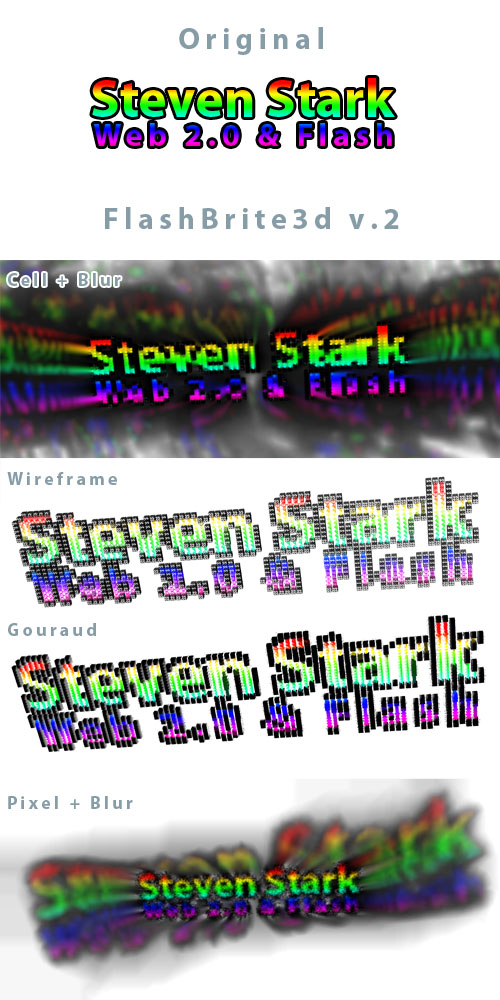
Setup if very simple. Download and extract the .zip file in this article, and modify the fb3d_v2_config.xml file. The config values are defined as such:
Options node holds the variables:
@spacing_mod – 1 based multiplier for the spacing between objects.
@mod_x – add how much to the x position?
@mod_y – add how much to the y position?
@size_mod – 1 based multiplier for altering base size of objects.
@poly_mod – 1 based multiplier for altering the default polygon count for objects. Note, square needs > 1.
@resolution – Resolution detail of the image. 0.04 is a good base number. Below 0.021 seems to kill Flash
@blur_fx – blur strength of the blur bitmap effect layer. 0 = off. 1 = painting.
@pixel_fx – 1 based multiplier for adding pixels to every shape. 0 = off.
@zoom – camera zoom, lower numbers show more.
@focus – camera focus.
@mtype – Material type. Options are: wireframe, solid, phong, gouraud, flat, cell, pixel3d, none.
@src – the url of the image to be converted.
@original – show the original image.
@output – show trace output.
if you want to change the path for the xml file, just edit the 3d_text.html file. The xml reference is in a number of locations. You will also be able to adjust the size and background color in the html.
FlashBrite3d is released under the GPL. If you use it, please leave a comment here with the URL of where it is you are using it. You may not sell or repackage this code. Thank you.
FB3D_2.zip <– compiled program
FB3D_2_source <– Source code, without Senocular, PV3d 2.0 or Effects branch libraries.